

September 2012 – Volume 16, Number 2
| Title | Eye Speak Version 3.1.2.6 |
| Author | Visual Pronunciation Software Ltd. |
| Contact Information | info@eyespeakenglish.com/ |
| Type of product | Pronunciation download Software or CD ROM |
| Platform | Windows 7/Vista/XP/2000 |
| Minimum hardware requirement |
256MB RAM or more 800MHz or better processor 400MB hard drive space Windows-compatible headset and microphone |
| Price | Network License: 1 computer: $250 10 computers: $1000 |
Introduction
EyeSpeak is a visual pronunciation training program mainly designed for improving users’ pronunciation at segmental and suprasegmental levels. Pronunciation exercises in the form of words, sentences, and role plays offer visual feedback, such as animated mouth movements and visual representations of pronunciation with charts of pitch, timing, and volume. Pronunciation assessment and vocabulary building are also included to support the pronunciation training by suggesting sound production lessons and offering vocabulary help. This software targets beginning, intermediate, and advanced English learners. Directions and instructions are available for learners in 10 languages (English, simplified Chinese, traditional Chinese, Japanese, Korean, Spanish, German, Italian, French, and Arabic). Users must create personal accounts which enable them to keep track of their procedures and progress. This individualized design promotes users’ self-monitoring and autonomy.
Description and Evaluation
On the homepage (see Figure 1), EyeSpeak displays five available sections symbolized as descending icons on the left side of the page: Assessment, Themes, Sound Lessons, Progress, and Dictionary.
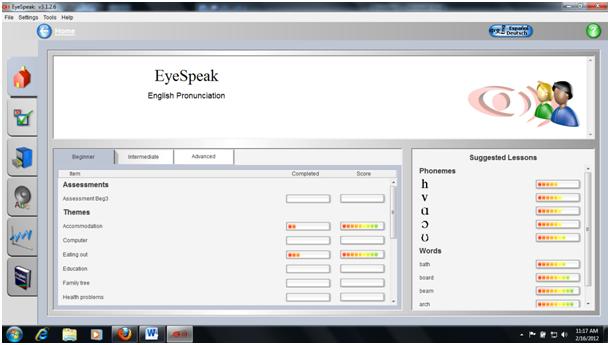
Figure 1. EyeSpeak home page
The first section is Assessment, where there are three pronunciation levels to choose from: beginner, intermediate, and advanced. Each of these levels contains five sets of assessment items. For each set, the assessment consists of five words and five sentences that users have to first listen to then record themselves saying. After finishing each set, a comprehensive chart displays an analysis of the users’ pronunciation, pitch, timing, and volume.
Following Assessment, the user may choose a topic from the Themes menu (see Figure 2). There are 16 topics, identical for each level, providing pronunciation as well as vocabulary exercises. Word and sentence production, as well as role play activities are available for pronunciation practice.
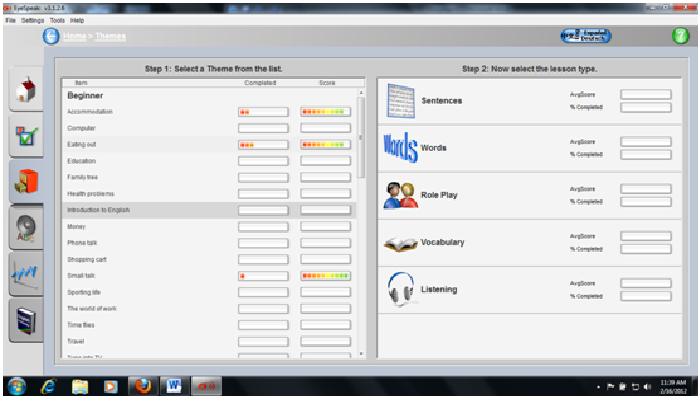
Figure 2. Themes available for practice activities
Words and sentences are related to each theme. By selecting a sentence exercise (see Figure 3) learners are taken to a screen with a list of example sentences. Once they select a sentence, often a question, the program plays a recorded segment of someone uttering the sentence. Users are then prompted to record their own voice as they repeat the sentence. This recording is then analyzed by the program for accuracy in pronunciation, pitch, timing, and loudness. Each spoken sound is aligned with that of the virtual teacher’s so that learners can compare their pronunciation to the teacher’s. This comparison can focus on whole words or individual phonemes isolated by the program. Contrasting one’s own recorded pronunciation to the target production allows a user to practice segmental as well as suprasegemental features of speech.
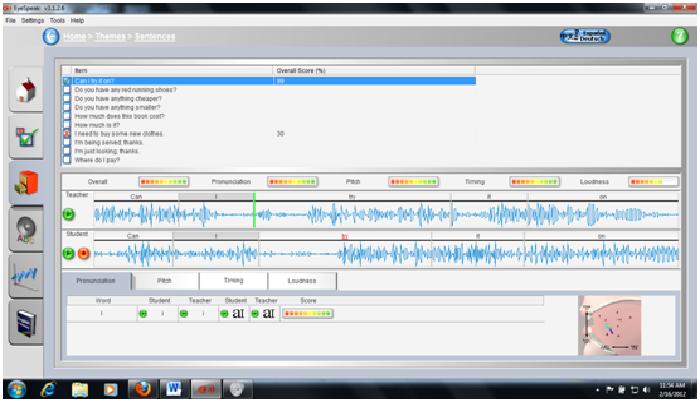
Figure 3. Sample sentence pronunciation activity
In the Words activity, learners listen to a word related to the chosen theme and are prompted to repeat that word. As they listen to the word and repeat it, they are provided an extensive written definition of that word on the screen. Learners then receive a score on a scale of a hundred that evaluates their pronunciation. EyeSpeak tries to get away from simple and systematic drilling practices by teaching learners the meaning of the word they are repeating. However, this objective may not be achieved with beginners or intermediate learners, because the definitions provided are somewhat complex and lengthy. From a pedagogical point of view, it seems that if learners do not know the word “bed” they will be unlikely to understand the definition provided, “raised platform to sleep in.” If the targeted learners are at a beginner or intermediate level, illustrating simple everyday vocabulary with pictures may be more useful than providing these complex definitions.
Apart from Words and Sentences, the Themes section provides Role Play activities (see Figure 4) as well as Vocabulary (see Figure 5) and Listening activities. Role Play activities contextualize sentence practice into interactive conversations. The Role Play activity utilizes pre-scripted sentences, a pre-recorded interlocutor’s voice, and pre-set timing to simulate real-life situations. Vocabulary and Listening activities aim at helping users with vocabulary. The Vocabulary activity has users spell the word by looking at its definition and the Listening activity has them listen to words they have to spell.
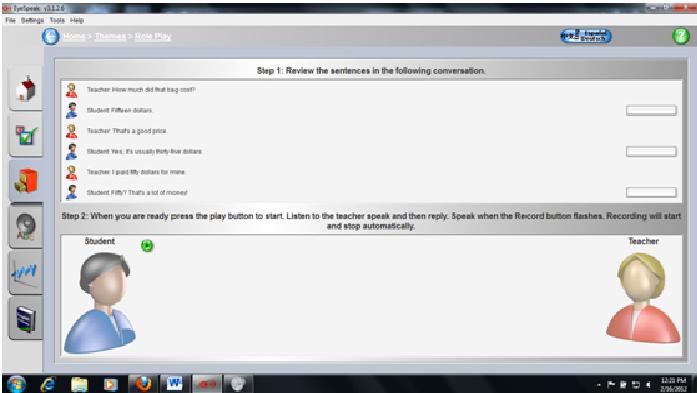
Figure 4. Sample Role Play activity
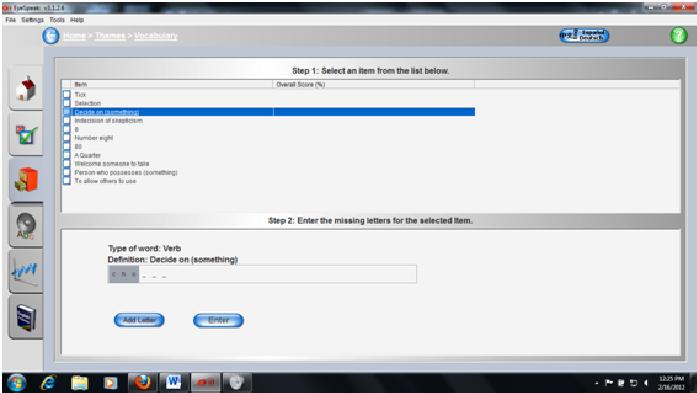
Figure 5. Sample Vocabulary activity
The section entitled Sound Lessons (see Figure 6) offers individualized sound training. Sorted by IPA symbol, each sound has Words and Minimal Pairs activities. While designed with the intention of helping users with specific training exercises they need, this section is underdeveloped and does not offer sufficient practice on several phonemes learners may want to practice. For example, nonnative speakers may find the sound [θ] difficult to pronounce and additional minimal pair exercises would be beneficial.
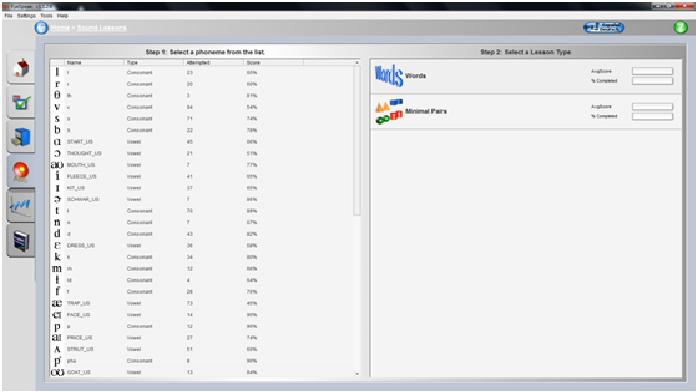
Figure 6. Sample Sound Lesson
The Progress section (see Figure 7) shows users a report of their pronunciation in four aspects: overall, themes, assessments, and phonemes. While percentage ratings are displayed for each aspect, additional sound courses are suggested to individual learners through the phoneme report. This report displays a list of sounds the users did not pronounce well enough in their previous practice.
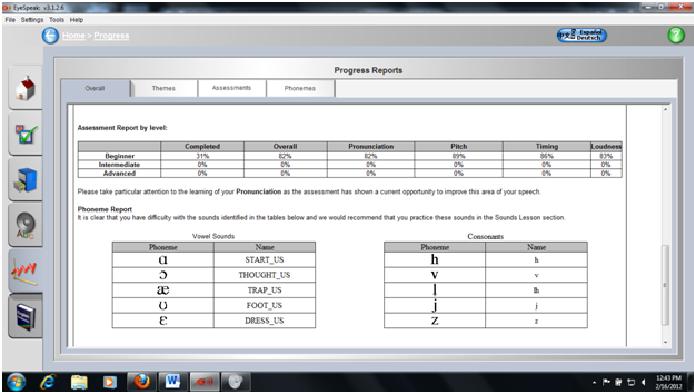
Figure 7. Sample Progress Report
The Dictionary enables users to search words by initial letters, end letters, or letters contained in the words. Available words are listed with definitions. Ratings are also provided for the words users have previously practiced. Every word on the list is linked to the same type of activities included in the Words exercises. While words from the Words activities can sometimes be found in the dictionary, words from the Sentences activities are never included, which limits the scope of this dictionary.
The program, as a whole, is very user friendly. To log into the program a user must first create a user profile. Profile information includes: name, login name, email, gender, accent (default is U.S.), native language, and class level. This information is linked to a personal account and allows instructors to gather data on individual users and provide explicit individualized feedback.
Upon logging in, the program is straightforward in its use and control. Users are immediately taken to a home screen from which they are able to access any lesson, activity, or section of the program. It is from this home screen that they can also view their progress, select a level of English proficiency and choose from five options on the left of the screen: Assessment, Themes, Sound Lessons, Progress, and Dictionary. Once the level of proficiency has been selected, the user can choose from any of direct links to Assessment or Themes. Once the user has completed an activity, suggested lessons appear on the right side of the home page. Navigation is made easy by direct linking between the main page and the exercise menu.
The language and instructions in EyeSpeak may be described as at an intermediate level. To ensure learner understanding, EyeSpeak provides an instruction translation tool, which allows students to change the instructions to their native language. Each section is easily navigated by one-click direction of the mouse; if at any time users are confused they can quickly navigate to any section or return to the home screen and begin again.
EyeSpeak provides an individualized instruction that allows learners to manage their own progress. More than promoting learner autonomy, EyeSpeak allows learners to have control over the material, which reduces the anxiety learners often develop at early stages of listening comprehension development (Morley, 2001). The individualized feedback promotes self-monitoring and can help learners take charge of their own learning process. However, as studies on self-access language learning have shown, it is not because learners have control over the material that determines whether they will use their knowledge in beneficial ways (Lu, 2010). Learners need to become familiar with the software so that they can benefit from the visual feedback (see Figure 8), which is sometimes hard to understand for beginners. Therefore, teachers should adopt Hubbard’s (2004) advice to give learners learner-training. Learners need to become aware of the features involved in pronunciation learning. They need to become familiar with the notions of stress, pitch, timing, and intonation in order to benefit from the feedback they receive. In order to use EyeSpeak efficiently with learners, teachers would first have to provide intensive technical and pedagogical training.
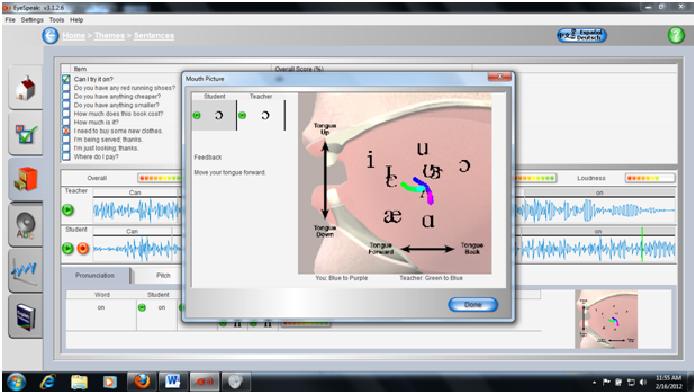
Figure 8. Visual feedback
The teacher’s application provided with the program is a tool that may help facilitate the implementation of EyeSpeak in the language learning classroom. The teacher can have access to individual students’ progress as well as the progress report of the whole class. Knowing the difficulties that students have can help teachers design activities that target individual students’ needs. However, if EyeSpeak promotes individualized learning and some measure of contextualization, approaches to listening and speaking need to consider the cross-cultural, social, affective, strategic, intertextual, and critical dimensions of the skills (Flowerdew & Miller, 2005). For example, teachers could choose specific words introduced in a lesson and have students practice the words before doing a communicative activity in class. This kind of approach would help contextualize the language and add an interactive aspect lacking from the program. As current approaches to pronunciation tend to avoid non-contextualized drill practices in the speaking class (Celce-Murcia, Brinton, Goodwin, & Griner, 2010), it seems that the role of the teacher would be to provide a contextual framework for the activities. In that respect, EyeSpeak has to be used along with more communicative class activities that would better consider the complexity of the listening and speaking skills.
Conclusion
In EyeSpeak, learners can learn segmental as well as suprasegmental features of English. However, the program can only be beneficial after a certain period of time because learners need to become familiar with all the functions of the program before they can really benefit from its use. Moreover, the program has limitations in terms of feedback accuracy and vocabulary explanation. In sum, EyeSpeak is a good tool to practice drills at all levels, but it needs to be supplemented with more communicative activities.
References
Celce-Murcia, M., Brinton, D., Goodwin, J., & Barry Griner (2010). Teaching pronunciation: A course book and reference guide. New York: Cambridge University Press.
Flowerdew, J., & Miller, L. (2005). Second language listening: Theory and practice. New York: Cambridge University Press.
Hubbard, P. (2004). Learner training for effective use of CALL. In S. Fotos, & C. M. Browne, (Eds.), New perspectives on CALL for second language classrooms, (pp. 45-67). Mahwah, NJ: Lawrence Erlbaum Associates.
Lu, D. (2010). A salutary lesson from a computer-based self-access language learning project. Computer Assisted Language Learning, 23(4), 343-359.
Morley J. (2001). Aural comprehension instruction: Principles and practice. In M. Celce-Murcia (Ed.), Teaching English as a second or foreign language (pp. 69-86). Boston: Heinle & Heinle.
About the Reviewers
Nadège Neta is a first-year MA-TESL student at Northern Arizona University where she also teaches ESL in the Program in Intensive English. She has experience teaching computer assisted language learning (CALL) classes and has been using EyeSpeak with her beginner students for two semesters.
<nadege.neta nau.edu>
Jieqiong Wang graduated from the MA-TESL program at Northern Arizona University in May 2012. Now she is teaching in the Intensive English Program at Ferris State University. She taught CALL for a year and a half, and used EyeSpeak with high-beginner ESL students for one year.
<jw445nau.edu>
Joseph Wright has taught Conversation and Listening and Speaking classes for three different skill levels as a Teaching Assistant (MA-TESL student) at the Program in Intensive English at Northern Arizona University. Pronunciation, with a focus on segmentals and suprasegmentals, is an integral part of his instruction.
<joseph.wrightnau.edu>
| © Copyright rests with authors. Please cite TESL-EJ appropriately. |